
Cheap Laptops for College Students in Kenya: The Ultimate Guide to Nairobi CBD Tech Shops
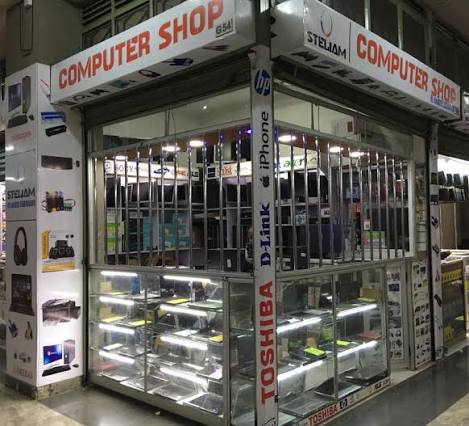
Walking into the Nairobi Central Business District (CBD) to buy a laptop can be a highly overwhelming experience. Between the aggressive shouting of promoters along Luthuli Avenue and the endless rows of glowing glass displays inside Tom Mboya Street exhibition stalls, it is incredibly easy for a college student to get conned. Smooth-talking vendors frequently polish old, slow machines, label them as “heavy-duty,” and sell them to unsuspecting students at exorbitant prices.
As a university student in Kenya, you need a laptop that can effortlessly handle online lectures, research assignments, continuous assessment tests (CATs), and perhaps a bit of Netflix or basic coding. But with a tight budget, buying a brand-new machine from premium showrooms is often out of reach.
Fortunately, Nairobi’s CBD is home to the most vibrant Ex-UK and refurbished laptop market in East Africa. You can acquire a durable, high-performance, business-grade machine for a fraction of the cost of a new consumer laptop. In this comprehensive review, we dive deep into the best cheap student laptops under Ksh 15,000 to Ksh 35,000 found in CBD electronics shops, and outline the exact rules to avoid getting ripped off.
The Golden Specs: What a College Student Needs in 2026
Do not buy a laptop based solely on how slim or shiny it looks. When scouting the CBD stalls, memorize these non-negotiable hardware parameters:
- The Processor (CPU): Insist on an Intel Core i5 (7th or 8th Generation) or an AMD Ryzen 5. Avoid “Intel Celeron” or “Atom” unless your budget is strictly under Ksh 15,000 and you only intend to type basic Word documents. RAM: Ensure the machine has a minimum of 8GB RAM. Modern web browsers and virtual learning platforms like Zoom or Microsoft Teams will painfully freeze up on a 4GB RAM machine
- Storage: Strictly demand a Solid State Drive (SSD), not a Hard Disk Drive (HDD). An SSD boots up Windows in less than 10 seconds and makes an older laptop run like a brand-new machine. Aim for a 256GB SSD or 512GB SSD.
- Battery Life: Ask the vendor to test the battery health. You need a machine that can sustain at least 3 to 5 hours of power to survive campus blackouts or long lectures.
Top 3 Best Budget Student Laptops Reviewed
1. HP EliteBook 840 G5 (The Best Overall All-Rounder)
The HP EliteBook 840 G5 is arguably the most dominant refurbished laptop across Nairobi CBD showrooms. Built originally for corporate offices, it features a premium aluminum chassis that handles the rough wear-and-tear of campus backpacks.
- Average CBD Price Street Value: Ksh 28,000 – Ksh 33,000 (Refurbished).
- Core Specifications: Intel Core i5 8th Gen, 8GB DDR4 RAM, 256GB SSD, 14-inch Full HD screen.
- Pros: Excellent typing keyboard, very modern design, and highly upgradeable RAM and storage slots.
- Cons: The speakers are average for loud music.
- Best For: Business, IT, media communication, and general university coursework.
2. Lenovo ThinkPad T480 or X280 (The Unbreakable Workhorse)
If you are studying computer science, engineering, or anything involving heavy typing and coding, look no further than a Lenovo ThinkPad. The Lenovo ThinkPad X280 is highly compact and lightweight, making it incredibly portable for moving between lecture halls.
- Average CBD Price Street Value: Ksh 23,000 – Ksh 27,000 (Refurbished).
- Core Specifications: Intel Core i5 8th Gen, 8GB RAM, 256GB SSD, 12.5-inch or 14-inch screen.
- Pros: Legendary spill-resistant keyboard, military-grade durable build quality, and excellent battery management.
- Cons: The exterior plastic casing design looks boxy and traditional.
- Best For: Coding students, programmers, long study hours, and students commuting long distances daily
3. Dell Latitude 7290 or 5480 (The Budget Friendly Student Saver)
Dell’s Latitude series offers incredible performance per shilling. The Dell Latitude 7290 is a 12.5-inch compact powerhouse that frequently drops below the 20k threshold, making it the ultimate budget life-saver.
- Average CBD Price Street Value: Ksh 18,000 – Ksh 22,000 (Refurbished).
- Core Specifications: Intel Core i5 7th Gen, 8GB RAM, 256GB SSD.
- Pros: Highly affordable, small footprint that easily fits onto tiny lecture hall desks, and easily available replacement spare parts.
- Cons: The small screen size might feel restrictive during long research sessions.
- Best For: Regular college students on a strict sub-20k budget who prioritize data safety and portability.
Trusted Electronics Shops in Nairobi CBD & Contact Information
When buying an Ex-UK or refurbished laptop, only purchase from established shops that offer a physical receipts and a minimum 3 to 6 months structural warranty. Avoid random sidewalk brokers. Here are three highly reputable tech hubs operating within the Nairobi CBD grid:
A. Nairobi Computer Shop
Located conveniently in the heart of town, they are widely known for stocking clean, high-tier Ex-UK business laptops.
- Physical Location: Kimathi House, Ground Floor, Next to Bazaar, Nairobi CBD.
- Phone Contact: +254 726 142 841 / +254 732 232 545
- Official Web Catalog: Check stock on Nairobi Computer Shop
B. Devices Technology Store
A highly reliable retail hub specializing in affordable student computing packages, student discounts, and certified testing.
- Physical Location: Revlon Plaza, 1st Floor, Biashara Street / Tubman Road, Nairobi.
- Phone Contact: +254 718 096 560
- Official Web Catalog: Check stock on Devices Technology Store
C. Phonex Technologies
An excellent spot for students tracking hard-to-find Lenovo ThinkPads and budget-friendly accessories
- Physical Location: Standard Buildings, Standard Street, Nairobi CBD.
- Phone Contact: +254 742 136 414
- Official Web Catalog: Check stock on Phonex Kenya
The “Anti-Con” Checklist: 4 Essential Testing Steps Before Paying
Before handing over your cash or completing an M-Pesa transaction inside a CBD shop, run this 5-minute diagnostic protocol on the actual machine:
- Verify the System Specifications: Scammers can easily paste fake stickers (e.g., placing a “Core i7” sticker on a Core i3 laptop). Right-click on ‘This PC’ on the desktop, go to Properties, and verify the actual processor generation and RAM size inside the Windows settings panel.
- Examine the Screen Details: Open a completely blank white webpage or document. Look closely for dark spots, bleeding lines, or flickering patches.
- Test Every Keyboard Key: Open Notepad and type out every single key from A to Z, alongside the number row. Laptop keyboard replacements in Nairobi will cost you an unplanned Ksh 2,500 to Ksh 4,000.
- Inspect the Ports & Charger: Plugin your phone or a flash drive into every USB slot to confirm they read data. Make sure the charging brick fits firmly into the power port and charges without overheating.
The Verdict: Which Machine Should You Buy?
- If you have a budget of around Ksh 30,000 and want something sleek, elegant, and modern that mimics a new laptop, go buy the HP EliteBook 840 G5.
- If your priority is heavy coding, long battery durability, and a keyboard that will survive years of endless typing, pick the Lenovo ThinkPad X280.
- If your funds are completely capped under Ksh 20,000, buy the highly compact Dell Latitude 7290. It gives you fast SSD speeds without straining your wallet
Published By Dan Barasa The C.E.O Wakenya TV
